Showing posts with label Product - iNeighbour. Show all posts

Data Governance Inherently comes along with iNeighbour Analytics


The fact is 90% organizations don’t have proper Data Governance in place. Data Governance department or unit is to handle requirements from regulatory bodies but at the same time, data governance is also keeping balance between Data Asset and Liabilities. 

Data governance framework creates a single set of rules and processes for collecting, storing, and using data. In details, it consists of the policies, rules, processes, organizational structures, and technologies that are put in place as part of a governance program throughout the organization.

It’s also considering as a set of principles and practices that ensure high quality through the complete lifecycle, it’s more to business rather than technology. To implement Data Governance in an organization, normally involves the following steps:

- Identify roles and responsibilities
- Define your data domains
- Establish data workflows
- Establish data controls
- Identify authoritative data sources
- Establish policies and standards

Without a robust Data Governance or information security measures within an organization, your business is at a higher risk of security incidents, such as data breaches, cyberattacks, or insider threats, which can result in financial losses, reputational damage, and legal repercussions. 

To ensure the data governance that compliance to certain recognizable standards, organizations can incorporate ISO27001 international standard that specifies the requirements for an Information Security Management System (ISMS). Because an ISMS is a framework of policies, procedures, and controls that helps you protect your data from various risks and threats. How can you integrate ISO 27001 into your Data Governance program? 

1. Assess your current data state 
Before adopting ISO 27001, you can understand your current data landscape and identify the gaps and weaknesses in the data security practices by using data governance maturity model to evaluate your data capabilities and performance across different dimensions, such as data quality, data architecture, data governance roles, data policies, and data ethics. Or you can also conduct a risk assessment to identify the potential sources and impacts of data breaches, leaks, or losses. 

2. Define your scope and objectives
The scope defines the boundaries of your ISMS, such as the data types, data sources, data processes, data stakeholders, and data systems that are covered by your ISMS. The objectives are to define the expected outcomes and benefits of your ISMS, such as the level of data protection, compliance, and trust that you want to achieve. 

3. Implement your Information Security Management System (ISMS)
After defining your scope and objectives, you need to implement your ISMS according to the ISO 27001 requirements. This involves developing and documenting your data security policies, procedures, and controls that address the specific risks and challenges that you might encounter. You also need to assign roles and responsibilities for data security to your data governance team and other data stakeholders. Moreover, you need to establish mechanisms for monitoring, measuring, and reporting on your data security performance and compliance.

4. Certify and improve your ISMS
The final step is to certify and improve your ISMS. Certification is an optional but recommended process that involves an external audit by an accredited body that verifies that your ISMS meets the ISO 27001 standards. Certification can help you demonstrate your commitment and credibility to your customers, partners, regulators, and other stakeholders. Improvement is an ongoing process that involves reviewing and updating your ISMS based on the feedback, lessons learned, and best practices that you collect from your data security activities.

Data Governance for iNeighbour Analytics 

Nowadays, organizations tend to subscribe to applications from SaaS (Software as a Service) providers. SaaS has become the production plant for inputting raw data and generating meaningful data output. It is preferable for the solution provider to offer extended DaaS (Data as a Service). It would be a plus point if the solution provider complies with ISO 27001 certification to ensure data quality and governance for the particular solutions, allowing you to focus on business value and organizational outcomes.

Subscribing to SaaS & DaaS and ensuring data governance compliance can mitigate risk management and data breaches, which are inherently core governance components. These compliances will cover the scope related to the applications you have subscribed to, such as the TimeTec iNeighbour Smart Residential System for your day-to-day residential management.

For your information, TimeTec, the owner of iNeighbour, has been ISO 27001 certified since 2018 and enhanced with ISO 27017 and ISO 27018 in early 2024. The ISO 27017 certification demonstrates cloud service security to users, while the ISO 27018 certification ensures that personal data is processed securely, further boosting customer confidence. Additionally, 2-factor authentication can be implemented as an option, and our yearly penetration test is an extra bonus for customers.


iNeighbour Analytics is available as an optional module for the iNeighbour super app, allowing JMB/JMC/MC/RA/Developers to continue the data journey, saving costs and time without the hassle and need for extensive data lifecycle measures mentioned earlier to maintain data quality. Data quality flows intuitively in a lineage form along with the applications, providing readily prepared templates for easy visualization and benchmark references.

By logging into iNeighbour Analytics, JMB/JMC/MC/RA/Developers and management can obtain a clear picture of their neighborhood activities overview and a single view easily in multiple presentation formats on the web and app, providing all the essentials for building management to improve the health of their property management and better portfolio of their owners and tenants.

iNeighbour Analytics offers instantaneous data crunching and data visualization, providing a 360° view on:

• Units and user analytics 
• Occupancy rates 
• Accounting analytics 
• Outstanding debt analytics 
• Facility booking analytics
• Visitors analytics 
• Patrol management analytics 
• E-info, e-Form analytics 
• Maintenance analytics 
• Parking analytics 
• Feedback/Inquiry analytics 
• Admin KPI 
• Many more

The Benefits:
- Increase unit owners' and tenants' satisfaction
- Detect and remedy blind spots easily
- Better accounting control
- More accurate advice on tenants and residents
- Enhance neighborhood security
- Review and improve property management
- Informed decision-making driven by data
- Boost property value

Why TimeTec iNeighbour Analytics? 

• Strong Data Governance with ISO27001, ISO 27017 & ISO27018
• 2-Factor authentication & yearly Pentest for further data security 
• Assurance of Data Quality 
• Available Web & App visualization 
• Affordable DaaS model, no setup cost 
• Fast deployment with ready templates
• Detect property management anomalies fast and efficient 
• Complete property management activities data consolidation from all sources 
• Extendable analytics to next activities for data enrichment
• Achieve data-driven property management strategy 
• Prepare for the future:  Smart community + AI 

Interested in learning more about iNeighbour Analytics and iNeighbour? Request your free demo of the iNeighbour Residential Property Management solution now.

03-8070 9933     |     Email     |     www.timeteccloud.com     |     Interest Form

Data Quality Intuitively comes along with iNeighbour Analytics


The quality of data is a prerequisite for a meaningful data analytics deployment. Characteristics of Data Quality are accuracy, completeness, consistency, uniqueness, and timeliness. Without Data Quality, data analytics process might paint a false picture and risking the companies to make wrong decision. 

The few elements contribute to Data Quality:

Accuracy: a company has to cross-check data with the source. If there is no data lineage, the accuracy is always questionable. 

Completeness: It doesn’t mean all data source, but it must adhere to the business requirements, especially those data is used for KPI measurement. 

Consistency: If data is flowed to multiple applications, it must have the same properties and not conflicting each other. For example, if the date format is DDMMYYYY,  make sure it should be the same across all applications. 

Validity: It should follow the business rules and parameters. For example, if the amount rounds up after 2 decimals, then it should.  

Uniqueness: There must be no duplication of data. 

Timelines: Data must be available when promised. 

There are quite some methods suggested by data experts to improve Data Quality, among them: Data Profiling, Data Standardization, Data Geocoding, Data Matching and Linking, and Data Quality Monitoring. 


To ensure Data Quality is kept, organizations have to maintain a Data Life Cycle, which involves the processes:

1. Find data through root cause analysis
2. Investigate data
3. Find potential causes
4. Perform root cause analysis
5. Apply correction
6. Monitor by continuous improvement monitoring
7. Sustain by applying fixes on sources or closest to source


Hence, to achieve Data Driven Organization is easier said than done. Since data itself generates further data, especially when raw data go into applications generate and regenerate much meaningful data, solution providers who have the capability to provide data analytics services should be the better choices for companies that take data seriously and have the plan for data transformation. 

Technological advancements that consolidate all activities into a single super app in recent years are aiding residential property management in its digital transformation journey. TimeTec is the prominent smart community solution provider capable of fulfilling the most sophisticated residential property management needs through its iNeighbour super app, and now furthering the journey on data transformation.

iNeighbour Analytics is available as an optional module for the iNeighbour super app, allowing JMB/JMC/MC/RA/Developers to continue the data journey, saving costs and time without the hassle and need for extensive data lifecycle measures mentioned earlier to maintain data quality. Data quality flows intuitively in a lineage form along with the applications, providing readily prepared templates for easy visualization and benchmark references.


By logging into iNeighbour Analytics, JMB/JMC/MC/RA/Developers and management can obtain a clear picture of their neighborhood activities overview and a single view easily in multiple presentation formats on the web and app, providing all the essentials for building management to improve the health of their property management and better portfolio of their owners and tenants.

iNeighbour Analytics offers instantaneous data crunching and data visualization, providing a 360° view on:

• Units and user analytics 
• Occupancy rates 
• Accounting analytics 
• Outstanding debt analytics 
• Facility booking analytics
• Visitors analytics 
• Patrol management analytics 
• E-info, e-Form analytics 
• Maintenance analytics 
• Parking analytics 
• Feedback/Inquiry analytics 
• Admin KPI 
• Many more

The Benefits:
- Increase unit owners' and tenants' satisfaction
- Detect and remedy blind spots easily
- Better accounting control
- More accurate advice on tenants and residents
- Enhance neighborhood security
- Review and improve property management
- Informed decision-making driven by data
- Boost property value

Interested in learning more about iNeighbour Analytics and iNeighbour? Request your free demo of the iNeighbour Residential Property Management solution now.

03-8070 9933     |     Email     |     www.timeteccloud.com     |     Interest Form

5 Ways of Security Enhancement with iNeighbour


Visitor Management System
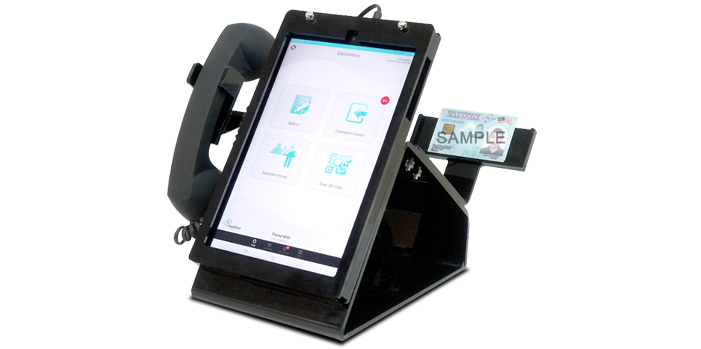
iNeighbour provides the guardhouse panel tablet replaces the traditional way of handwriting in a notebook, the Visitor Management System able to record every visitor's checked in-out time, the purpose of visit, the unit and resident they visited. The residents would receive the live notification once the security checked-in-out the visitor, they are also able to report the “wrong visitor” check in their unit to management.

For management, admins are able to customise the settings and different questions before allowing visitors to access from their own neighbourhood iNeighbour account web portal. Management admin is also able to generate different reports, for example visitor checked-in-out, pre-registered and invited visitor, visitor checked-in trend, restricted visitor, wrong visitor checked-in and etc from web portal.

Intercom

The security guards are able to intercom contact residents handphone through the iNeighbour Visitor Management System guardhouse panel tablet, it is able to control access and ensure that only authorised visitors are permitted into the neighbourhood. And for contact numbers of residents will remain concealed and protected for security and privacy purposes from iNeighbour Visitor Management System.


BLE-2

TimeTec BLE-2 is integrated into the iNeighbour Visitor Management System, the function can automatically trigger the visitor check-in and check-out lane barrier gates to open, it can avoid the security guards simply manually pressing the push button to allow the visitor access. Therefore the security guards have to register every visitor via the guardhouse tablet panel before allowing visitor access into the neighbourhood.

Panic Button
The Panic Button is designed to ensure the safety of the residents within a neighbourhood. In the event of an emergency, residents can trigger the Panic Button buzzing alarm in order to inform the guardhouse panel tablet to alert guards on duty and emergency contact persons.

The residents will be given the choice for the option to specify the types of incident involved (standard, burglary, fire, medical assistance), and 4 photos will be taken via the resident’s smartphone to be uploaded into the server for better description of the incident happening or for the sake of obtaining crucial evidence.


iPatrol System

iPatrol system is our guard patrolling solution that offers cloud connectivity. The iPatrol system provides flexible and rotated schedules remotely,  and also able to track your security guards KPI more accurately compared to the offline system.The supervisors and admin also will receive the live notification for any late or misses scanning during patrolling, and also able to generate the daily, weekly,and monthly report from the iPatrol system web portal. Security guards are able to report incidents during their patrolling duties to the management personnel in real-time.

03-8070 9933     |     Email     |     www.i-neighbour.com     |     Interest Form

9 Ways How iNeighbour Make Your Property Management More Efficient


With all the workloads to be handled by such few people in the office, it can be frustrating at times. Here is where the iNeighbour system plays its role in automating the process and helps to save time.

 
Visitor Management System
Starting with registering visitors, the iNeighbour system can capture and record all visitors who go in and out. This enables the management to keep track of the visitor’s details in the case of an emergency. Furthermore,
iNeighbour provides invitation and pre-registration for visitors to obtain a QR code and show it to the security guard for a speedy process upon checking into the neighbourhood.


In-App Payment

When it comes to payment, without a doubt it’s considered one of the most detailed yet troublesome works for management. Using the iNeighbour system, management can save a lot of time as the system enables the residents to make payments via the iNeighbour app. From the generation of invoices to knocking off outstanding amounts and generating receipts no longer needs to be done manually. Not to mention it reduces human errors as well.


Announcements

Posting announcements would be within your fingertips. It can be done anywhere and anytime as long you log in to the web portal. Even attachments can be added to the announcements to provide even further clarification to the residents.


Feedback/Inquiry Management

Don’t forget that residents often provide feedback or complaints to the management where it might be left out or not recorded. iNeighbour has the perfect solution for this, as it enables both the management and residents to have communication for feedback on its status, new to in progress and finally resolved. Weekly or monthly reports can also be generated to justify the work done, therefore reducing disputes.


Facility Booking Management

The management can create facility booking slots via the iNeighbour system. No more manual books are needed and you even have the option of auto approval or manual approval for each booking made by the residents. The system also has various advanced settings to prevent misuse of the feature, eg: Only x numbers of slots can be booked by a parcel unit, must utilise existing booked slots only able to book another slot and more.


E-Documents

The committee can post important documents for every user to view or download from the iNeighbour app. The latest version of your house rules or every year’s AGM meetings minutes. A place for users to always refer back and not worry about it flooding with other messages.


E-Forms

Forms are also one of the troubling issues faced by both the management and residents. As forms are usually in hardcopies where residents are required to spare some time to come to the management just to fill in the forms, where failure to do so in a way might obstruct the procedure or management’s policy. The iNeighbour app allows for form customisation, enabling residents to fill in the form via the app. Once it has been submitted, the management is then able to respond to it where it could reduce the hassle and even provide a record in the system.


E-Contacts

Every once in a while, there will be calls coming into the management to request contacts such as a guard’s contact, contact for the gas provider or even a plumber’s contact. Using the iNeighbour app, the management could upload any useful contact information for the residents to view and call. It’ll be very convenient for the residents to call for those useful contacts instead of them repetitively looking for management for such requests.


Panic Alert

A feature that is good to have, but hopes nobody has to use it. The iNeighbour app has a panic button for the residents to press where it would notify both the management, guards and emergency contacts (neighbours or friends) if any emergency were to occur. This would increase the response time in handling emergencies for the management and security guards.

There are even more ways that the iNeighbour System can benefit the property manager. Do not miss this chance to adopt a system to automate and increase efficiency in your work routine.
 
03-8070 9933     |     Email     |     www.i-neighbour.com     |     Interest Form
 

5 Ways to Improve Your Property Manager Efficiency


Property managers are well known for multitasking and handling dozens of tasks per day. Unsurprisingly, you feel there are not enough hours per day. Here are some ways to maximise your productivity.

Planning

There is a saying when you fail to plan, you plan to fail. It is because of the overwhelming tasks to complete every day, imagine what could have happened if a property manager does not have an end in mind in their daily operation. Things might be messy. Planning by creating a to-do list and then allocating every task a time to finish it would add structure to your day-to-day. You could start by prioritising the tasks to be done according to priorities. According to the book, Eat That Frog by Brian Tracy, one is advised to do the most important task the first thing in the morning to prevent procrastination.


Creating A System

Property managers are bound to handle issues from residents and tenants in a daily manner. So in other words, the issues that they are dealing with are repetitive. If that is the case, then creating a system or a standard operational procedure would save lots of time. For instance, prepare emails or templates for responding to residents' emails, inquiries, applications and even complaints. This would not only save time but also create consistency in every staff’s tasks.

Communication

A good property manager is not limited to only handling task efficiency but is also expected to be able to communicate with the residents or tenants as well. This plays a huge role especially in resolving disputes among the management and residents. Since managing a whole residential area by itself is not an easy task, a property manager must also be able to communicate well with their staff. Daily or weekly meetings could be held to ensure each individual is clear on their assigned tasks. This would in turn improve efficiency and at the same time create a conducive environment for everyone to work in.

Transparency

When it comes to monetary issues, it is a very sensitive topic. This is where usually the owners or tenants come to request their payment receipt, statement of accounts or even question about the late payment interest. The property manager is expected to be able to provide all this information at their fingertips. I too believe that most of the management can provide at least such info. However, it might require some time to actually print out the receipt or even generate the reports. What if you could adopt an automated system where it could show the owner or tenants their invoices, receipts and even account statements automatically? This would not only show that the management is transparent but improve efficiency from a managing perspective.

Adopt Software-Aided System

I believe I have touched a little bit on the adoption of the system in the previous tips. Why still rely on manual work when you could use a system to conduct the practice? Nowadays, we have these all-in-one software systems that could manage the whole residential ecosystem from the visitor management system to the accounting system and even guard patrolling systems. The system not only improves communication between management and residents but can also keep track of info from both the residents and visitors. Besides storage and accessibility of store info will no longer be a concern for the management as most of the property management software now is cloud-based. In short, acquiring a software system for managing property will be a norm soon, where of course in the end it still depends on the management on how they can fully utilise the system.

03-8070 9933     |     Email     |     www.i-neighbour.com     |     Interest Form

Visitors Analysis for Residential Properties in Malaysia


The visitor management system is one of the core modules for the smart community system. It is at the forefront with the objective of welcoming friends and deterring strangers.

If compared with the rigid and normally standalone conventional visitor management system that mainly served administrators, today’s smart visitor management system with its cloud-based nature offers plenty more features than its old incumbents to benefit residents at large with its mobile App.   

Figure 1: iNeighbour Mobile app main UI for resident
 
iNeighbour, the leading smart resident community system, caters for some of the major features for visitor management:

⦁ A feature to send invitations to visitors, or visitors pre-register themselves, to achieve pre-informed visitation.
⦁ Incorporate an In-App intercom to allow security guards to call residents before allowing any visitor to enter the community. This feature could replace the need for a commercial intercom system thus potentially saving a huge sum of investment.
• For a community that has more than one guardhouse, all guardhouse accounts could be synchronized in one system, which means if a visitor enters a community via a different guardhouse, he or she can exit at any guardhouse, but the information is still intact within the system.
• A feature of alert to notify respective parties such as management office, guardhouse and owner when the time is up i.e for the contractor. In most communities, contractors are only allowed to carry out renovation work from 9 am to 5 pm.
• Integration with IoT, such as IP cameras, auto barrier gates and much more. During visitor registration, the IP camera could capture the photo or car plate number of the visitors; and the barrier gate will automatically open once registration is completed. The image captured also can be set to send to unit owners.
• IoT extendable to access control system for common doors and lifts to designated floors, which visitors received a QR code or selfie to register their face during registration for access control.
• Allow customizable settings. JMB can decide the type of information required from the visitors during registration.
• Embedded OCR (Optical Character Recognition) for guardhouse panel to fast read identity cards, driving licenses, and passports to identify and check-in visitors swiftly.  


 Figure 2: Guardhouse Android Tablet Panel with embedded OCR feature and barrier gate integration

The cloud-based system can provide strong in-depth data analytics for individual JMB (Joint Management Body) or, RA (Resident Association) to better understand the frequent types of visitors, peak hours on weekdays and weekends, so that the residential communities plan the guard routine, improve the access control, inflow and outflow of visitors, or to deal with any visitation incidents and different types of visitors more efficiently.

To provide the public with a big picture, in general, there are an average of 12 visitations per household in one month for gated guarded residential communities in Malaysia. If a community has 500 units in total, this means it will receive 6,000 visitors in a month, and 200 per day, mostly happening in 18 hours from 6 am to 12 midnight, based on iNeighbour’s past two months’ statistics (March & April 2022), extracted from 170 residential communities situated in Malaysia with 747,534 registered visitations in total.

Among the visitor registration types as shown in Figure 3, the majority or 86.41% of visitors are on-the-spot (walk-in) registrations; the other 13.59% of visitations are pre-registered, mostly by invitation (99.8%) from residents, rather than visitors self-registration which is merely 0.2%.  


Figure 3: Visitor Registration Types

We also broke down the purpose of visits into 10 different categories as shown in figure 4, namely family/friend, parcel/courier delivery, food delivery, drop-off/pickup, contractor, Grab/taxi, maid/cleaner, Airbnb/short-stay and others. Its percentage showed as follows:

The largest part of the visitations is contributed by friends/relatives/family members. Online ordering led to parcel delivery becoming more and more important nowadays during and after the Movement Control Order (MCO) due to the Pandemic.


Figure 4: Purpose of Visit

iNeighbour provides features for users to report wrong visitors if guards check in a stranger to their unit, to notify the management of the incident as the precaution records. In Figure 5, it showed there is an approximately 0.22% amounting to 1,970 wrong-visitor cases being reported in March & April 2022.
 

Figure 5: Wrong visitor

For weekly visitor analysis, our statistic in Figure 6 found quite a balance for the number of visitors throughout normal weekdays, with a lower visitation rate on Mondays (12.97%). For weekends, Saturdays registered the highest rate of visitors (15.52%), and Sundays showed the lowest (11.1%) throughout one week.

For daily visitor analysis, 9 am – 3 pm would be highest on visitations and midnight 12 am till 7 am would be the lowest.
 

Figure 6: Day & Hour Visitor Analysis

iNeighbour provides a comprehensive dashboard for management to monitor their visitors in real-time, and 11 types of analytical reports to better manage their visitors as follows:

⦁ Visitor Checked In-Out Report
⦁ Pre-registered and Invited Visitor Report
⦁ Restricted Visitor Report
⦁ Visitor Profile Report
⦁ Total Visitor Report
⦁ Total Visitor Registration Report
⦁ Total Checked-in Visitor Report
⦁ Visitor Check-in Trend Report
⦁ Visitor Aging Report
⦁ Total Wrong Visitor Checked-in Report
⦁ Wrong Visitor Check-In Report
 

Figure 7: Web UI for visitor report module


For more information about iNeighbour, please log in to
 
https://www.timeteccloud.com/ineighbour/

A quick sneak peek for iNeighbour, check out our YouTube video: 


About Author:
Teh Hon Seng, Group CEO of TimeTec Group of Companies. Prior to forming TimeTec, Teh led PUC Founder (MSC) Bhd to be listed on MESDAQ (ACE) market of Bursa Malaysia in 2002. Teh initiated the R&D in fingerprint technology in 2000, which later developed into a renowned global brand for commercial fingerprint product known as FingerTec. In 2008, he foresaw the trend of cloud computing and mobile technology, and over the years, he had strategically diversified and transformed its biometric-focused products into a suite of cloud solutions that aimed at workforce management and security industries including smart communities and digital building system that centered around the cloud ecosystem. Teh has more than 20 patents to his name, and he is also a columnist in a local newspaper and a writer of several books.