Showing posts with label Attendance. Show all posts

Managing Part-Time Workers Attendance with TimeTec TA: A magic tool businesses should have at their disposal


Part-time employment is integral in most labour forces, and according to the recent World Bank data, it even constitutes to more than 40% of total employment in countries such as the Netherlands, Switzerland and Australia. This translates to a significant number of workers that are usually scattered across all industries. Why so many part-time workers? In some cases, industry requirements or corporate strategies results in employers looking for more part-time employees or cutting back hours. On the other hand, it could also be by choice, due to a range of factors like study commitments, childcare, nature of jobs available and personal preferences.

For many companies, engaging part-time staff is a great option. Companies get to control overhead, hire based on workload or specialist skills required, as well as retain valuable staff that wish to switch from full-time work. However, from a HR perspective, managing their attendance and payroll claims might be a hassle.

If your company happens to be one of those employing part-time staff, let’s consider some of the ways that TimeTec TA can help.

Don’t Waste Money - Subscribe to What You Only Need


Some organisations rely heavily on part-timers to cope with spikes in workload and demand. For instance, retail and hospitality business booms around festive and holiday seasons while the education industry goes busy during school terms. When staff count increases, your attendance management system will also have to accommodate the expansion. With TimeTec TA cloud application, this will not be an issue as the system is capable of maintaining its performance and response regardless of whether increasing or decreasing the number of users and size of data for processing. You can scale up for the periods when business grows and scale back down during off seasons.

The user management module is also user friendly, as Admins can easily add users or import employee data and instantly deactivate users once they leave the company. Effective user management is essential when HR have to manage a constant turnover of part-timers. Imagine how much administrative task this involves if your company have newcomers every other day or week in never-ending cycles.

In tandem with that, cost wise, the application also offers good value, as you can adjust the subscription based on real-time business requirements. You only have to pay for what is currently needed and we even provide an option for monthly subscription, so if you hire a few more part-time staff as helping hands for a month long event, just tack on the extra licenses for a month to your account and you will be good to go. The starting cost is also relatively low, a tiny fraction of salary or wages.

Versatile Clocking - Monitoring On the Get Go


In terms of collecting attendance, you can also find many Clocking options that comes with TimeTec TA. Besides supporting FingerTec terminal connection, the system has a few clocking methods that do not require any new hardware in order to use it, such as GPS or Wifi clocking via the TimeTec TA mobile App. Additionally, if preferred, you can also pair the App with NFC tags or Beacons. You can mix the options, choose one method for office staff and another for mobile ones.

The App is probably the best choice for staff that are not based at the central workplace. Some companies will have part-timers working in multiple branches or outlets. At other places, the staff may work from remote locations such as event venue or project sites, not to mention those working from home. To facilitate attendance clocking, these employees just need to install TimeTec TA App into their smartphones, login and they can start clocking from anywhere. If you wish to, you can also permit supervisor clocking whereby the supervisor on site can be the one that does clocking for your part-timers, together with photo verification.


Attendance Approval for Claim - Saves Time Gains Accuracy


For part-time jobs such as sales assistants, waiters, caregivers, tutors, university staff and etc., one common distinguishing trait is that often, the employees are paid by hourly or daily rates, with extras on public holidays. On top of that, the work hours can be variable, determined on an as needed basis by the supervisor. As such, for HR to process payroll for certain part-timers, it’s a must for them to submit claim forms which are signed off by a supervisor.

With our system, during this approval process, supervisors can easily access the updated attendance records to recheck actual hours worked, even through the mobile App. Moreover, there is an Attendance approval function that can be enabled if you require these approvers to acknowledge that they verified the attendance sheet and it matches the hours claimed. Therefore, HR does not have to step in to prepare the attendance records beforehand and can delegate all the detailed checking to supervisors which saves time for payroll processing. Not only that, if you are looking for online Overtime approval, it is also one of the options available.

Flexible Scheduling & Roster Made Easy


When it comes to part-time work arrangements, there are all kinds out there. There are those that work the normal week at fixed times, some work by the hour or by sessions booked, and others only on certain days of the week. Part-time sales promoters often take on week-long to month-long jobs and they could be working consecutive days in that period.  It can get complicated and difficult to track, so you need a flexible system like TimeTec TA that takes care of all the different scheduling requirements. With this solution, supervisors are able to quickly create weekly, daily or flexi schedules that will suit any kind of part-time staff. Use a flexi schedule if employees are allowed to clock in/out at any time or a daily schedule for those on shifts.

Detailed Reports and Transparency Every Single Time


Ultimately, the purpose of an attendance management system is to keep track of attendance and provide useful information to the right people. TimeTec TA provides data for attendance, work hours, short hours, overtime and more with Attendance Sheet and Reports. There is also multi-user access, which means everyone involved such as HR, Head of Departments, supervisors and the employees themselves will be able to access relevant and real-time information. Giving access to the staff is particularly important, whether for transparency and fairness or to enable claims submission. This also allows them to check for discrepancies and if they do spot errors, initiate a request to edit attendance.

With the numerous features available in TimeTec TA, you will surely find a few, if not more, that helps to improve your company’s attendance management, whether for part-time or full-time employees. To find out more, you can sign up for a free trial or contact us at info@timeteccloud.com.


Attendance System Suitable for Coworking Space


Coworking space is the trend in today’s business where companies share workspaces with one another. These coworking places offer not only affordable and decent office spaces employees who are looking to escape the isolation of home office or coffee place but they also offer an array of amenities to mirror a regular office such as hot-desks, private meeting rooms, kitchens, coffee and even more. Interestingly, these coworking spaces also create a community from diverse kinds of businesses, providing a great opportunity for networking and communication.

According to global research by Deskmag and Deskwanted, since working in a coworking space, 74% of coworkers are more productive with 86% have a larger business network and 93% have a bigger social network. At the beginning of this trend, the coworking spaces are frequented mostly by startups because coworking spaces offer manageable cost for having a proper place of business. A startup can take as small as one space or expand to a few more as necessary. Nevertheless, the trend has also caught the attention of larger organizations that want to manage their flexible employees worldwide, hence many larger companies are also taking advantage of this new trend of fresh and hipster-ish coworking spaces. Bloomberg reports that General Electric, KPMG and Merck have started using these spaces to manage their workers.

However, while the coworking space offers a conducive and a cool place to work, businesses are still having concerns over a few aspects and one of them is EMPLOYEE ATTENDANCE.

Keeping up with the workforce management, more businesses have started to make flexible hour an option to their employees in order to meet the work life balance expectations of the modern workers. Therefore, in finding a balance between having everyone under a single roof, companies need to have a system to strengthen the trust between the company and the employees.


TimeTec TA is the perfect solution for companies having flexible and mobile employees working from remote locations such as from coworking spaces. The system has a few clocking options that do not require any expensive hardware in order to use it. Employees just need to install TimeTec TA App into their smartphones, login and use. The control of the settings is still under the care of the company administration. Two great clocking options offered by TimeTec TA are GPS clocking and Wifi clocking. With the GPS clocking feature, a company has an option to set a geofence to let the employee clock in within a certain radius from the house or the coworking space. On the other hand Wifi clocking is available when the employee is within the workspace wifi range. On top, TimeTec TA can manage scheduling and reports in the same system. Not only that, with the adoption of TimeTec TA, the company can subscribe TimeTec Leave for better and convenient leave management.

TimeTec TA can also be an added value service for a coworking space where tenants can get the report of their employees over a period of time from the coworking space provider,

Either a company wants to be strict or relaxed about time attendance, TimeTec TA offers a good and affordable tool for companies to monitor their scattered flexible employees, whether in a country or worldwide.

Contact us at info@timeteccloud.com for a good deal for coworking spaces companies.


2019 Office Automation Resolution


No, we’re not talking about robot workforce just yet. Yes, the robots are coming, complete with artificial intelligence, better looks and all, and perhaps we’ll have to deal with full blown robotic workforce by 2050, but for now, let us talk about achieving automation with the help of software solution in our everyday’s operation.

Come 2019, we can't be doing business like it’s 1999. Something has got to change and to better manage the workforce of this century, businesses have to think about time management, collaboration, transparency and efficiency all throughout.

If you are wondering which solutions an office should be looking to make an upgrade, you can start with these 3.

Employee Scheduling & Time Attendance
Majority of businesses are concerned about employees attendance clocking because it’s directly linked to payroll and productivity. No business owners would be okay with employees reporting to work at their own sweet time. Hence, rather than relying on manual clocking such as punch card system or Windows-based attendance system that can give you some idea of your operation, businesses are advised to cut their losses and automate time attendance and scheduling with cloud solution. Automation of attendance and scheduling through cloud will not only save business owners a lot of administration time in handling various schedules along the year, it also can provide a better overview of their entire workforce’s discipline, and the bottomline is, it can save the company’s operating cost in the long run. Cloud solution for attendance such as TimeTec TA by TimeTec provides a company with an up to date clocking data that is accurate and accessible at anytime, and it is linkable to payroll solution to ease salary preparation on every month end.  Give TimeTec TA a try and see whether it fits your operation’s requirements.


Leave Management
It’s time to put a stop to using paper forms to apply for leave; it’s so dated and wasteful. Go paperless with cloud leave management App such as TimeTec Leave by TimeTec. Let the system automate your employees leave entitlement accrual calculation at the beginning of the year with 100% accuracy based on your company’s leave policy and settings. TimeTec Leave taps on the power of smartphone to let the users apply for their leaves easily via the App and the approvals can be obtained instantaneously from the managers, and balance is tallied right away for an up to date leave balance at all times. A cloud system such as TimeTec Leave provides employees with data transparency and delivers efficiency to the entire operation and especially to HR because the workload has been reduced significantly and efficiently by the software.  Cloud leave solution like TimeTec Leave will leave room for HR to focus on other pressing matters at hand when all employee leave matters are being taken care by itself through a systematic and automated solution.


Access Security
Keys are here to stay but nowadays, keys come in various forms. There are key cards, key fobs, biometrics as keys, voice as keys and many more. The latest in the market is smart access security using IoT via smartphones. Apart from providing convenience whereby users do not need to carry any token as keys, it provides audit trail of all access activities happening at any particular IoT in the smartphone. i-TimeTec is an app that can connect to BLE-2 and  BLE-5, the Bluetooth Low Energy controller to provide access to doors, turnstiles and barrier gates. The BLE can be installed discreetly on access barriers and all access controls be done from the smartphone installed with i-TimeTec App. There are four unlocking methods offered via i-TimeTec include tap to open, voice, auto unlock and QR code reading. The use of i-TimeTec for access security is suitable for various types of modern offices.


Shift to automation one at a time and start 2019 Office Automation with on a few key areas to embrace the future.


Use TimeTec TA’s Attendance Approval for Better Control of Your Workforce


Introduction

Exciting news for TimeTec TA’s System Admins! When it comes to working hour calculations and payroll matters, we understand how it pays to be extra careful. This may even mean that as a control measure, you regularly require all managers to recheck and acknowledge the attendance data you’re exporting from the system. 

If that’s the case for you, don’t miss out on our newly released Attendance Approval feature that will help automate your approval process. Even better, the approval function can be performed by Admins on both web and mobile platforms for added convenience.


Process

1) Enable this option in System Settings - Attendance Approval allows Admin to make approval on staff attendance.

2) Go to Attendance > Attendance Approval - Admin with the special Approval rights (provided in System Role) will be able to approve attendance; Approved attendance can be unapproved.

3) Admin can also choose to notify the user once they have approved/unapproved user’s attendance.  

4) Only approved attendance can be exported through the Export Attendance, Export Attendance to Payroll and Export Attendance Scheduler features.  

5) Once approved, the data is not allowed to be updated by edit attendance, download data from terminal, update user’s group roster, update schedule setting, generate attendance manually and etc. 

6) To update approved attendance, users must first proceed to unapprove the attendance.

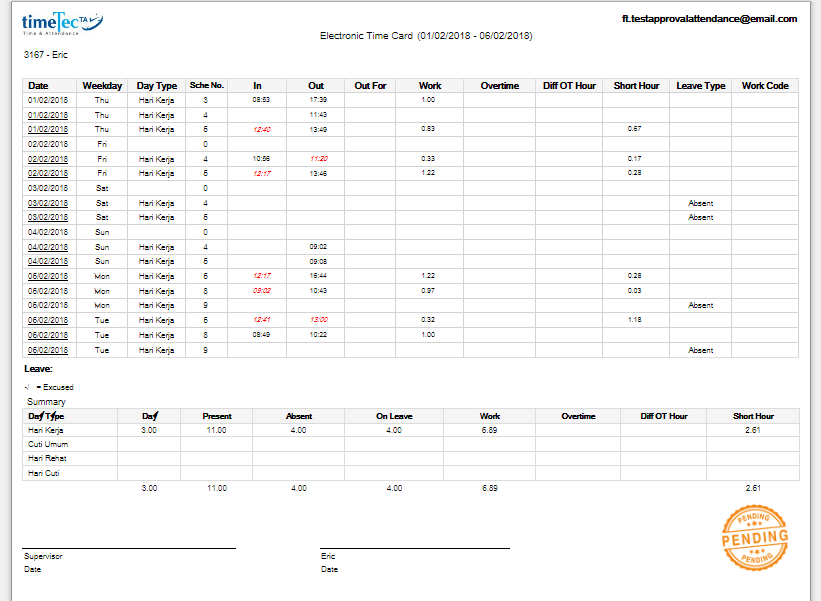
7) Electronic Time Card shows Approved/ Pending status.

For more details of what’s available with this feature, please refer to the step-by-step guide below. There are 4 sections to this topic:

A) How to Enable/ Initial Setup
B) How to Approve (Web)
C) How to Approve (Mobile app)
D) Reports & Export Attendance Data after approval    

A) How to Enable/ Initial Setup

1. Login to Admin account and go to System Settings. Click Edit, tick to enable Attendance Approval and select the date to start the approval.


2. Once you enable this feature, you will be able to view Attendance Approval in the Menu (it’s hidden if option is not enabled).

cid:image002.png@01D3C51C.35DE17A0

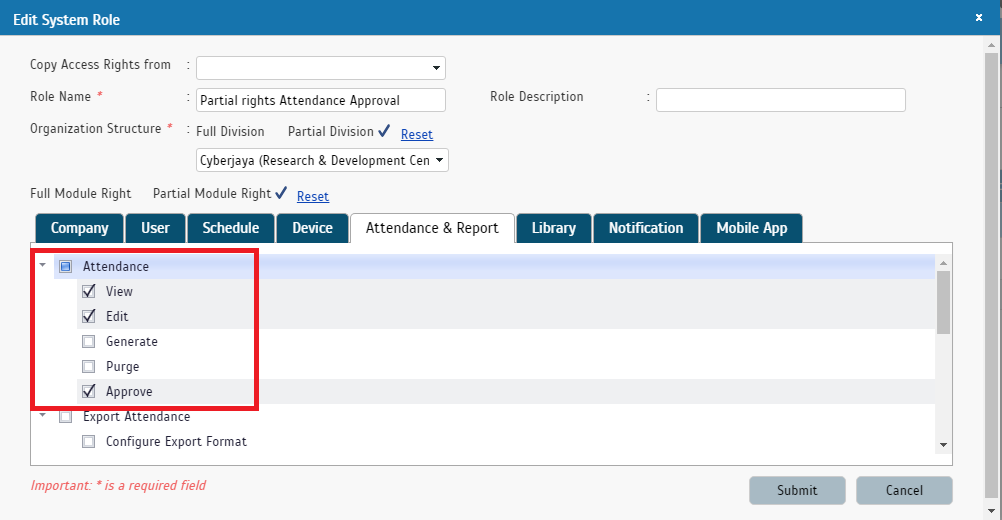
3. Next, configure the Approvers by reviewing whether Approve rights have been given to the relevant Admin roles. Go to User> Manage System Roles & Admin > System Role and select to Add/Edit. Note: There are 2 separate rights involved, approve in Web and approve in Mobile. i) Admin given right to “Approve” is allowed to approve attendance in Web

cid:image003.png@01D3C51C.35DE17A0

ii) Admin given right to “Approve” is allowed to approve attendance in Mobile app

cid:image004.png@01D3C51C.35DE17A0


B) How to Approve (Web)

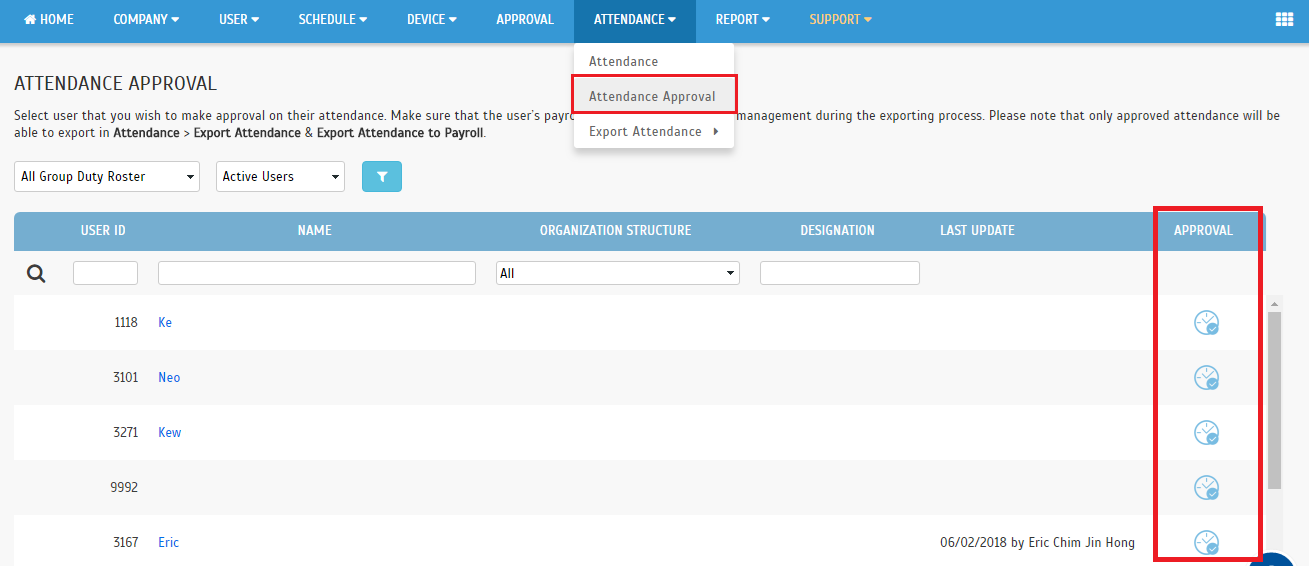
1. If you are the supervisor/manager charged with approving staff attendance, go to Attendance > Attendance Approval in the Menu (it’s hidden if this option is not enabled in the account).

cid:image002.png@01D3C51C.35DE17A0


2. At the User Listing, click on the Clock icon to view attendance details of the chosen user and to approve or unapprove attendance.


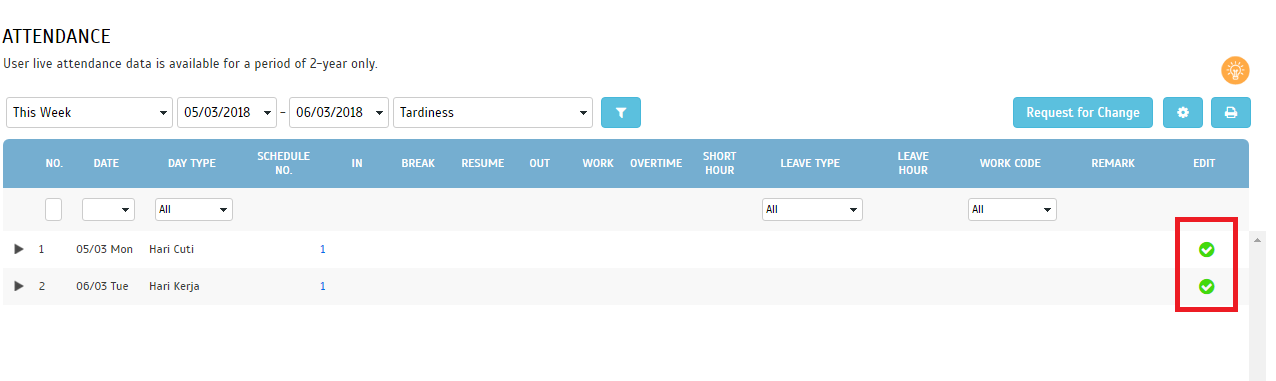
3. Next, the screen will display Attendance details. Use the filters to retrieve your relevant date range. Select/tick the relevant date(s) you wish to approve, then click “Approve”. Once a date is approved, a green tick will be shown in the Edit column. You can also repeat the steps to unapprove attendance for any date. i) “Approve” button will be shown when all attendance is unapproved

ii) “Unapprove” button will be shown when all attendance is approved


iii) Both buttons will be shown when attendance is a mix of approved and unapproved  


4. After you have approved any date, a success message pops up. There will be an option to notify the affected user. The same notification option also appears if you subsequently choose to unapprove attendance.


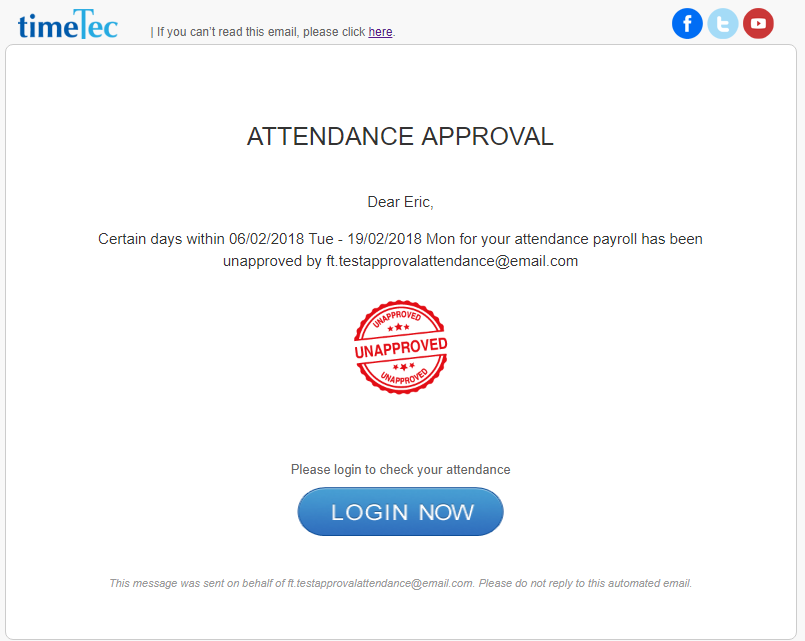
5. If you choose to notify user, system sends an Attendance Approval Email to the user.

i) Approved
cid:image009.png@01D3C51C.35DE17A0

ii) Unapproved

cid:image011.png@01D3C51C.35DE17A0


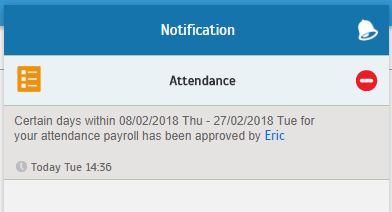
6. Additionally, if you choose to notify user, system also sends an Attendance Approval Notification to the user.

i) Approved 


ii) Unapproved


7. When user login, they will also be able to see if their attendance has been approved.

cid:image023.png@01D3C51C.35DE17A0

C) How to Approve (Mobile app) 1. Login to Admin account > Menu > Attendance > select the Approval icon (Clock) on the left of User Listing.


2. Next, at the chosen user’s Attendance Approval screen > filter for your appropriate Date Range > select “Approve” icon at upper-right corner. This will approve the whole date range (use the filter if choosing individual date). Once the dates are approved, a green vertical panel will be shown on the left. You can also repeat the steps to unapprove attendance for any date. i. Approve Icon


ii. Approved Attendance Details > May also choose to “Unapprove”


3. After you have approved any date, a success message pops up. There will be an option to notify the affected user. The same notification option also appears if you subsequently choose to unapprove attendance. i. Approve- Option to notify user

ii. Unapprove- Confirmation message & Notification option


4. If you choose to notify user, system sends email & mobile notification to the user.


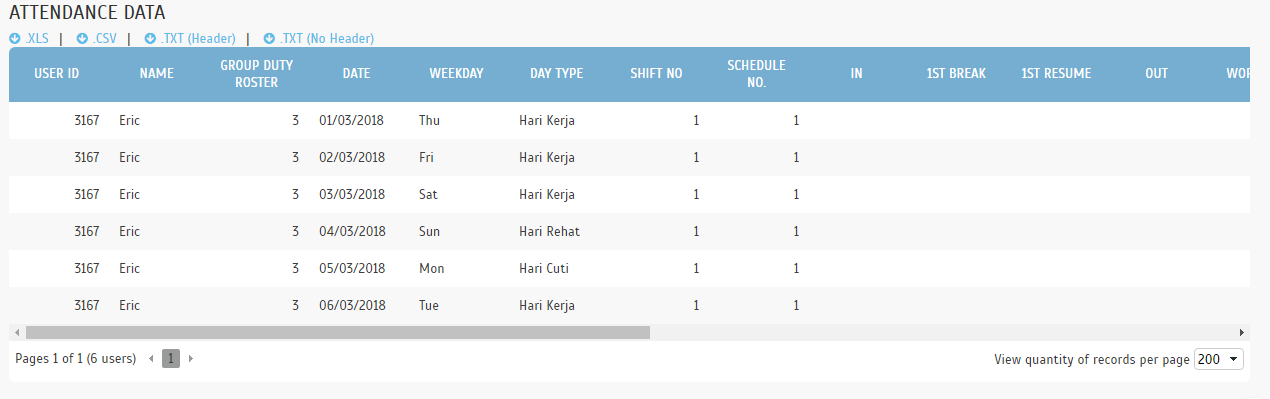
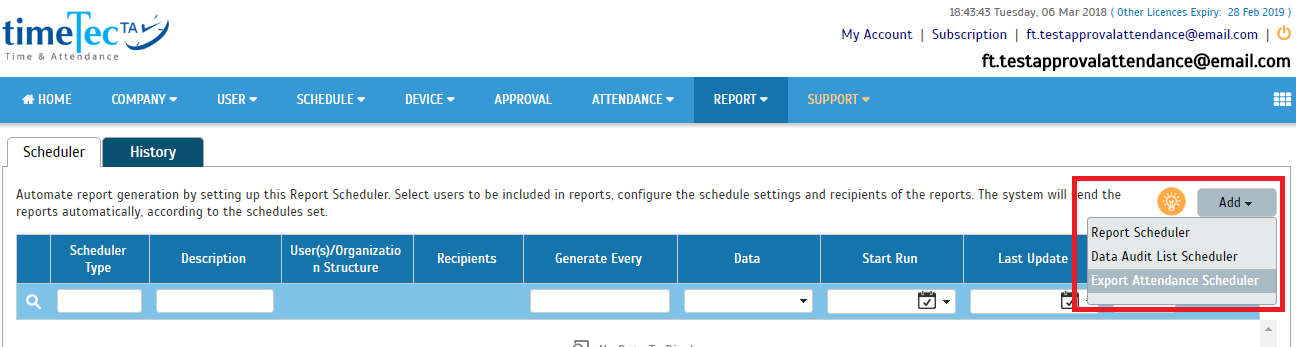
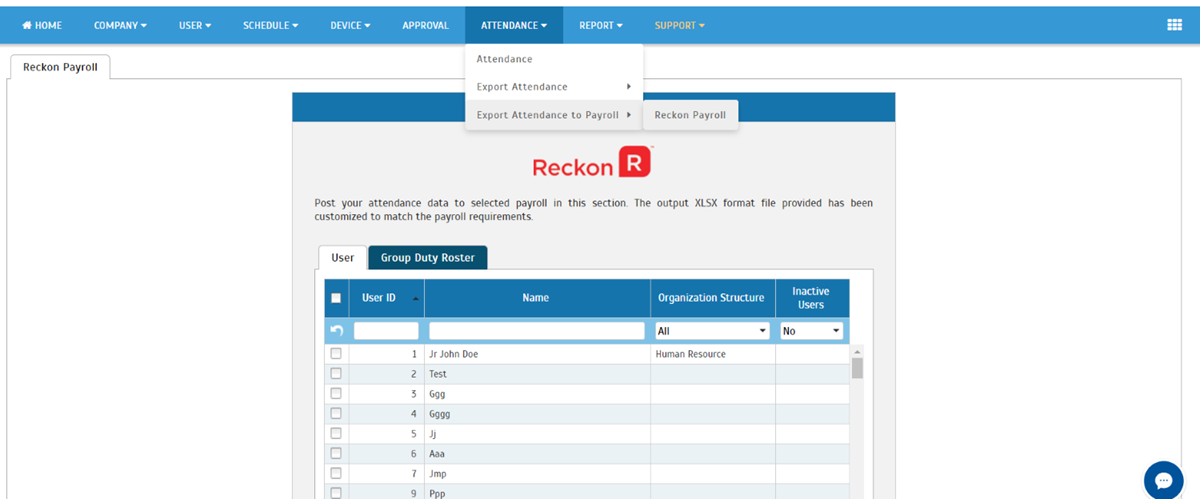
D) Reports & Export Attendance Data after approval To recap what is mentioned above: 1) Only approved attendance can be exported through Export Attendance, Export Attendance to Payroll and Export Attendance Scheduler features.
2) Once approved, the data is not allowed to be updated by edit attendance, download data from terminal, update user’s group roster, update schedule setting, generate attendance manually and etc.
3) To update approved attendance, users must first proceed to unapprove the attendance.
4) Electronic Time Card shows Approved/ Pending status. Only approved attendance will be able to be exported i. Export Attendance


ii) Export Detail

cid:image020.png@01D3C51C.35DE17A0

iii) Export Summary

cid:image021.png@01D3C51C.35DE17A0

iv) Export Attendance Scheduler 

cid:image022.png@01D3C51C.35DE17A0

v) Export Attendance to Payroll 

cid:image001.png@01D3D0F0.0BA97620

Report - Electronic Time Card

i) Approved

cid:image017.png@01D3C51C.35DE17A0

ii) Pending Approval

cid:image018.png@01D3C51C.35DE17A0


Increase Employee's Engagement, Solve Unfair Scheduling with the Right Solution!

By: Norana Johar

One of the most critical workforce management issues of 2017 is how to deal with the unfair schedules that affect employees. Basically speaking, unfair schedules is when the schedules are built around the needs of the company or organization first with little or no regard at all on the employees’ side.


The consequence of this is damaging in the long run because employees who feel that they have not been treated fairly will eventually lose their engagement with the company. Hence, this will lead to string of problems that will ultimately cost the company its staffs turnover. The impact of losing an average employee could still be manageable albeit it being costly, but the real issue is when a company loses a single skillful staff due to unfair scheduling, then the cost will, in turn, multiplies to include more than just monetary value.


Gone were the days where all says are in the employer’s hands. Nowadays, systems being deployed in handling scheduling must have features that promote fairness within employee/employer relationship. Managers have to ensure that the supposed schedules are planned correctly in the first place in order to avoid any last minutes changes and confusion that could cause their staff’s frustration. What’s more, employers will also need to realize that employees have responsibilities outside of the office too and when work schedules don't even consider those disruptions, it is only fair to say that disengagement will be around the corner. For instance, some employees might plan to spend their time with their loved ones and by getting called to work unexpectedly will leave the situation at home much less to be desired than before. That said, others could also be making plans that involve money such as traveling and when that plan is disturbed; the lost is theirs to bear.


In getting scheduling done right, the schedules have to be planned way ahead of time by the person in charge while those who are involved in the said schedules can check their own and apply for any adjustments wherever necessary. In other words, managers could ‘suggest’ a plan earlier and employees can inject their say within that decision-making period thus promoting a healthy relationship between managers and employees. Avoid last minute changes as much as possible by creating a policy that controls it. For example, no employee is allowed to change the schedule a day before the actual schedule starts except for severe cases like a death of a family member. By broadcasting the policy clearly, employees understand where they stand in when it comes to scheduling thereby reducing any form of discontentment to the minimum.


A good scheduling system has to be an automated system whereby the process for managers to draft schedules is easy and let’s not forget the fact that the employees should also be able to respond to them in real-time. Hence, heightening engagement for the benefit of the organization.

TimeTec TA is a cloud-based solution for time and attendance that has a comprehensive scheduling module that can cater from the simplest to the most complex schedules you might require. Moreover, this solution is connected to the TimeTec TA App that permits employees to view their schedules, request for a schedule change as well as for supervisors or managers to handle all those requests in real-time using either the computer or smartphone which in turn promotes better communication and transparency. TimeTec TA has made scheduling easy and it is designed to stimulate fair scheduling for the benefits of employees and companies.